
Complete Code Push guide
Flutter over-the-air updates: A complete technical guide to Code Push
Section titled “Flutter over-the-air updates: A complete technical guide to Code Push”A critical bug ships to production. Users report crashes in your payment flow. Your team has a fix committed and tested within the hour. Then you file for App Store review and wait. Twenty-four to forty-eight hours on a good day, longer if it lands on a weekend. By the time the fix reaches your users, the damage to retention and app store ratings is already done.
React Native teams sidestep this problem by swapping a JavaScript bundle. Flutter teams have historically had no equivalent option. This guide explains why that’s true, how Shorebird’s Code Push solves it at the runtime level, and how to get the full implementation running in your production pipeline.
Why Flutter can’t do what React Native does
Section titled “Why Flutter can’t do what React Native does”Flutter compiles Dart code to native ARM machine code at build time using ahead-of-time (AOT) compilation. The output is a compiled snapshot baked directly into the app binary. At runtime, there’s no interpreter between your Dart logic and the hardware.
React Native works differently. The JavaScript logic runs inside a JS engine (Hermes or JSC), loaded from a bundle file at startup. Expo’s EAS Update ships a new bundle to devices over the air because swapping the JS file at the path the runtime reads from is all it takes. The app’s logic layer is just a file on disk.
Flutter has no equivalent file to swap. The libapp.so on Android (and its iOS
counterpart) is compiled Dart code in binary form. You can’t diff a .dill
snapshot against a new one and swap it at runtime the way you’d replace a
JavaScript bundle. The runtime isn’t built to load updated compiled code
dynamically.
This isn’t a missing feature waiting to be added. It’s a direct consequence of AOT compilation, which is also what gives Flutter its consistent frame rate, fast startup, and predictable performance. The same property that makes Flutter fast is what makes swapping code hard.
Solving this requires modifying the Dart runtime to support some form of dynamic code execution, which is what Shorebird does. They modified both the Dart VM and the Flutter engine to make genuine diff-based OTA code updates possible on Android and iOS.
How Shorebird Code Push works
Section titled “How Shorebird Code Push works”When you build a release with Shorebird, the resulting binary contains two components: the standard AOT-compiled Dart snapshot and a modified Dart interpreter that Shorebird built and maintains. On startup, the Shorebird runtime checks Shorebird’s servers for a patch scoped to that specific release version. If no patch exists, the AOT snapshot runs exactly as it would in a standard Flutter build. If a patch is available, the runtime executes the updated Dart code through the interpreter instead, while the AOT snapshot remains in place as the fallback.
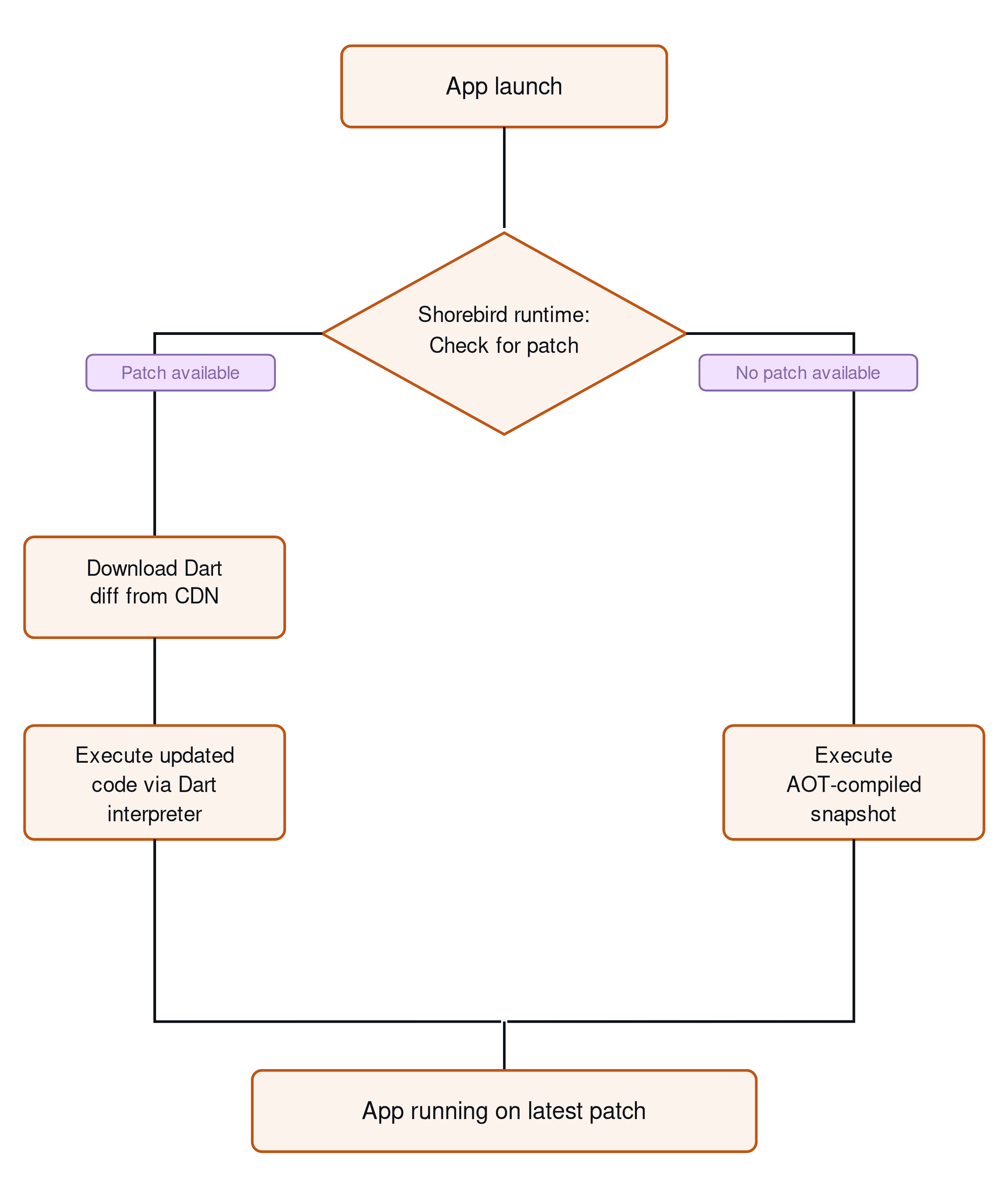
The system architecture documentation describes this in detail, but the operational model comes down to two concepts you need to keep distinct: releases and patches.
A release is a full app build that includes the Shorebird runtime. You build it with the Shorebird CLI, register it with Shorebird’s servers, and release the build to your users as you currently do today. Once users install it, that install is tied to a specific release version in Shorebird’s system.
A patch is a Dart code diff computed against that release. Shorebird compares the new Dart snapshot against the original, produces a binary diff, and uploads only the changed bytes to its CDN.
Patches are version-scoped: a patch built against release 1.2.0 only applies
to devices running 1.2.0. Users still on 1.1.0 won’t receive it until you
ship a patch targeting that release.
This model has a hard boundary. Here’s what you can and can not do with patches and releases:
| Can update over the air | Requires a new store release |
|---|---|
| All Dart and Flutter widget code | Native Kotlin, Swift, Java, or Objective-C code |
| UI layout, business logic, routing | Native plugin platform channel implementations |
| Strings, state management, providers | AndroidManifest.xml or Info.plist changes |
| Dart-layer bug fixes | New runtime permissions |
| Pure-Dart Flutter package upgrades | Native binary assets |
| App configuration managed in Dart | Changes to native dependencies |
If you need a new camera permission, you need a new release. Anything outside pure Dart goes back through the store.
Setting up Shorebird: From init to first patch
Section titled “Setting up Shorebird: From init to first patch”The setup from an existing Flutter project to your first deployed patch takes about 15 minutes.
Step 1: Install the Shorebird CLI.
Section titled “Step 1: Install the Shorebird CLI.”Install the Shorebird CLI on your development machine using this command:
Then authenticate with your Shorebird account:
Step 2: Initialize Shorebird in your Flutter project.
Section titled “Step 2: Initialize Shorebird in your Flutter project.”Run this to set up Shorebird in your Flutter project:
shorebird init adds a shorebird.yaml file at the project root containing
your app_id, and configures the Flutter engine binding to include the
Shorebird runtime. Your existing Dart code and project structure stay unchanged.
The only new file tracked in version control is shorebird.yaml.
Step 3: Create a release.
Section titled “Step 3: Create a release.”In your current build scripts (typically in your CI configuration), all you need
to do is update your flutter build commands to:
These commands build your app with the Shorebird engine embedded, save a copy of
the release in a private bucket under your Shorebird account, and produce the
artifacts you upload to the stores: an .aab for Play Console and an .ipa for
App Store Connect. Your store submission workflow doesn’t change.
Step 4: Submit to the stores through Play Console and App Store Connect as normal.
Section titled “Step 4: Submit to the stores through Play Console and App Store Connect as normal.”You can now use the .aab file for Play Console and the .ipa file for App
Store Connect to publish your app to the store. If you publish to stores other
than Google Play and the App Store, or distribute directly to your users for
distribution, that’s OK too. You can just use the compiled binaries that
Shorebird creates for your distribution process. Once a version of your app
built using Shorebird is live, you are ready for over-the-air updates.
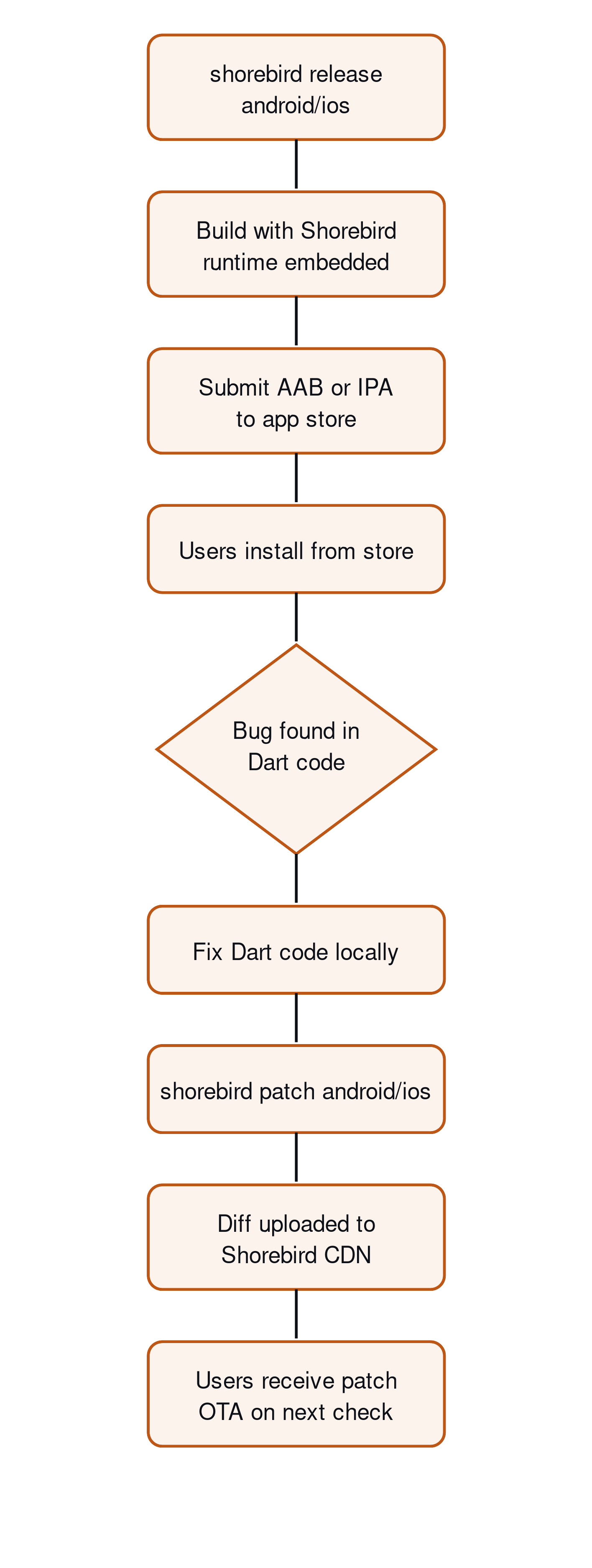
Step 5: Push a patch after fixing a bug in Dart code.
Section titled “Step 5: Push a patch after fixing a bug in Dart code.”After you have made a change that you need to deliver to your users, you can create and publish patches over-the-air. To do that, use the following commands:
Shorebird diffs the new Dart snapshot against the registered release, uploads the delta, and makes it available immediately via its CDN. Users running that release version download the patch in the background on their next update check.
Here’s what that flow looks like:
PushPress Senior Mobile Developer Allan Wright described the change in their release cycle: “The speed to release updates has skyrocketed. It used to take four days to two weeks depending on urgency. Now it’s way faster. The reliability of shipping fixes is night and day.”
For teams running GitHub Actions, Shorebird provides
documented CI integration
that slots directly into existing workflows. Both shorebird release and
shorebird patch run in CI with standard environment variables for
authentication. Codemagic
also has first-class Shorebird support for teams already using it as their build
platform.
Controlling update behavior in-app
Section titled “Controlling update behavior in-app”By default, patches download in the background and apply on the next cold start. For most bug fixes, this is the right behavior. Users get the fix without any interruption, and you avoid forcing a restart mid-session.
The shorebird_code_push Dart
package gives you programmatic control when you need it. Add the dependency:
Then check for and download updates explicitly:
Call checkForUpdate() from the initState of your root widget, or from an
AppLifecycleListener callback on app resume. Both are reasonable entry points.
The root widget approach catches users on every cold start; the lifecycle
callback catches returning sessions.
For a patch addressing a security vulnerability or a crash hitting a significant
fraction of your users, you can force a restart immediately after download. Wire
this through TerminateRestart from the
terminate_restart package or
your own restart mechanism. Reserve forced restarts for genuine incidents. Most
patches don’t qualify, and your users will notice an unexpected restart.
You’ll also need to set auto_update to false in your shorebird.yaml file:
Doing this is not required to use check for and download updated manually, but
Shorebird will automatically download and apply updates if your shorebird.yaml
file does not contain auto_update: false.
Advanced patterns: Staged rollouts, rollbacks, custom tracks, and patch signing
Section titled “Advanced patterns: Staged rollouts, rollbacks, custom tracks, and patch signing”High-velocity teams don’t ship patches directly to 100% of users. WAGUS founder Michael Gallego described their patching cadence: “Patches ship fast. One release had 60 patches. Most of them are small quality-of-life updates requested by users. With Shorebird, they could ship them the same day.” Shipping that volume safely requires using a pattern from those discussed below.
Percentage-based rollouts
Section titled “Percentage-based rollouts”You can set up percentage-based rollout controls using Shorebird’s “tracks” feature and a key-value store like Firebase. With this, you can set up a progression that:
- Starts at 5% and monitors crash reporting (Crashlytics, Sentry, or your current stack) for 60 to 90 minutes
- If error rates stay stable, expands to 25% and checks again
- Moves to 100% after your second checkpoint passes cleanly
Starting at 5% limits your blast radius. If a patch introduces a regression your test suite missed, you catch it at 5% user exposure rather than after it’s affected your entire active user base.
Rollbacks
Section titled “Rollbacks”When a patch causes a regression, you can use the Shorebird Console to roll it back. Once you roll back a patch, the installed apps learn about the rollback as soon as a patch check occurs, and it is implemented on the next boot, with no app store involvement and no review queue. The rollback documentation covers command syntax and the confirmation flow.
Rollback takes effect at the infrastructure level immediately. Users receive the previous patch the next time their app checks for updates, with no action required on their end.
Custom tracks
Section titled “Custom tracks”Shorebird supports named update tracks for staging and beta environments:
Beta testers receive the patch immediately while production users remain on the current stable version. This gives you a real staging-to-production pipeline for OTA patches, not just for store submissions.
You can assign users to tracks in your Flutter code, and you can promote a patch
from beta to stable once it’s passed QA. The
custom tracks documentation covers
track configuration in full.
Patch signing
Section titled “Patch signing”Patch signing ensures that only code you explicitly authorize can run on your users’ devices. Each patch is signed with a private key that you generate and control. The Shorebird runtime verifies this signature on-device before applying an update. If the signature doesn’t match, the patch is rejected.
This follows the same model used by app stores, where code must be signed by a trusted key before it is allowed to run. In this case, you control that key. Shorebird never has access to it, and neither does any infrastructure involved in delivering the patch.
Because verification happens on the device, a patch cannot be applied unless it was signed by your key. Even in unlikely scenarios, like a compromised CDN, upstream provider, or delivery network, an attacker still wouldn’t be able to ship a valid patch without your signing key.
Transport security like TLS protects how patches are delivered. Patch signing protects what is delivered. Together, they ensure that patches arrive securely and haven’t been tampered with.
For teams in fintech, healthcare, or any regulated industry where code changes require an audit trail, patch signing is the recommended baseline configuration, not an optional extra.
App Store and Play Store compliance
Section titled “App Store and Play Store compliance”Shorebird’s approach is compliant with both stores.
Apple’s App Store Review Guidelines section 2.5.2 prohibit apps from downloading and executing code that introduces or changes the app’s features or functionality outside of the App Review process. The guideline includes a carve-out: apps may execute code that runs through a built-in interpreter, provided the code doesn’t change the app’s core purpose or add capabilities that would otherwise require App Review.
Shorebird’s mechanism fits within this carve-out. Patched code runs through the Shorebird Dart interpreter, not as loaded native code. Shorebird maintains a documented compliance position covering the boundary in detail.
The practical rule: use OTA patches for bug fixes, performance improvements, and iteration on existing features. More broadly, avoid shipping changes that would surprise users or bypass the intent of App Review. That’s not unique to Shorebird; it applies to any interpreted-code OTA mechanism on iOS.
Google Play’s developer policies are more permissive. Play explicitly allows OTA code updates without the same interpreted-code carve-out requirement, because the platform doesn’t impose the same restriction. Standard policy compliance applies (no loading code from untrusted external sources, no violations of content policies), but OTA patching itself carries no special compliance risk on Android.
If your team operates in a regulated industry, document each patch with a short description of what changed. The Shorebird console stores version history for every patch across every release, and on the Enterprise plan the audit log records who created, promoted, or rolled back each patch. Pair that record with your existing change management process and you have the audit trail most compliance frameworks require.
Your next step: Push a patch in the next 30 minutes
Section titled “Your next step: Push a patch in the next 30 minutes”The full path from a clean Flutter project to your first OTA patch:
- Install the CLI by running the
curl -fsSL https://shorebird.dev/install.sh | bashcommand. - Run
shorebird loginand thenshorebird create my_appinside your project directory. - Run
shorebird release androidorshorebird release iosand submit the resulting artifact to your store track of choice. - Make a one-line Dart change: update a string constant, fix a null check, or adjust a widget parameter.
- Run
shorebird patch android(orios) and confirm the patch appears in the Shorebird console.
Shorebird’s free tier supports the complete CodePush workflow, including the Shorebird console and patch delivery, up to the free tier patch limit. That’s enough to run a full end-to-end proof of concept without a payment method on file. The getting started documentation walks through account setup and the same sequence above with additional context on each step.
Add Code Push to your Flutter app in under 30 minutes. Get started with Shorebird