When your Flutter app has three screens, setState works fine. When it has
thirty, shared user sessions, paginated lists, real-time socket data, and
concurrent API calls turn setState into an obstacle. You start passing
callbacks five widgets deep. Your Provider notifiers accumulate business
logic, and suddenly you’re calling repository methods from inside build(). The
app works, but nobody on the team can trace what triggered a UI rebuild.
This is the state management inflection point. It’s the moment teams either
adopt a disciplined architecture or spend the next 18 months debugging race
conditions and unintended rebuilds.
The BLoC (Business Logic Component) pattern,
authored by former Shorebird team member Felix Angelov, is the answer most
serious teams land on. Google’s own Flutter team uses it internally.
Nubank, one of the world’s largest digital banks
with 90 million customers, built its app on it.
BMW runs it in production. The
flutter_bloc package has logged over
1.4 million downloads on pub.dev. That’s not hype, it’s validation at scale.
This guide shows you how BLoC works, how to implement it with modern Dart 3.x
features, and why its predictability makes it a strong foundation when you’re
using tools like Shorebird to ship over-the-air
patches to a live app.
Before we get started, let’s look at the basics first. BLoC has three moving
parts:
An Event is an intention. The user taps “Fetch Weather,” and your app
dispatches an event. Events don’t carry logic; they carry data. They say
“something happened” and provide whatever context is needed to handle it.
A State is a snapshot of what the UI should reflect. Loading, success,
failure, plus any data needed to render.
The BLoC receives events, executes business logic (validation, API calls,
caching), and emits new states through a Dart Stream. Widgets listen and
rebuild when the state changes.
Dart 3 gives you sealed classes and exhaustive switch expressions. With a
sealed base state, the compiler knows every possible subtype, so your UI
switch becomes a compile-time guarantee. Add a new state and forget to render
it, and the build fails.
That’s one of the biggest quality-of-life improvements for BLoC codebases in
years.
The repository has one job. Take a city string and return a Weather model, or
throw a meaningful error.
It does two network calls:
Geocode city name to coordinates
Fetch current conditions for those coordinates
// lib/features/weather/repositories/weather_repository.dartimport 'dart:convert';import 'dart:io';import 'package:http/http.dart' as http;import '../models/weather.dart';/// Repository that:/// 1) Geo codes a city name -> lat/long/// 2) Fetches current weather for lat/long////// Uses Open-Meteo:/// - Geocoding: https://geocoding-api.open-meteo.com/v1/search/// - Forecast: https://api.open-meteo.com/v1/forecastclass WeatherRepository { final http.Client _client; WeatherRepository({http.Client? client}) : _client = client ?? http.Client(); Future<Weather> fetchWeather(String city) async { final normalized = city.trim(); if (normalized.isEmpty) { throw const FormatException('City cannot be empty.'); } final coords = await _geocodeCity(normalized); final json = await _fetchCurrentWeather(coords.latitude, coords.longitude); return Weather.fromOpenMeteo(city: coords.displayName, json: json); } Future<_GeoResult> _geocodeCity(String city) async { final uri = Uri.https( 'geocoding-api.open-meteo.com', '/v1/search', <String, String>{ 'name': city, 'count': '1', 'language': 'en', 'format': 'json', }, ); final res = await _client.get(uri, headers: _headers()); if (res.statusCode != 200) { throw HttpException('Geocoding failed (HTTP ${res.statusCode}).'); } final body = jsonDecode(res.body); if (body is! Map<String, dynamic>) { throw const FormatException('Invalid geocoding response.'); } final results = body['results']; if (results is! List || results.isEmpty) { throw StateError('No results found for "$city".'); } final first = results.first; if (first is! Map) { throw const FormatException('Invalid geocoding result.'); } final lat = first['latitude']; final lon = first['longitude']; final name = first['name']; if (lat == null || lon == null || name == null) { throw const FormatException('Geocoding result missing fields.'); } final admin1 = first['admin1']; final country = first['country']; final displayName = [ name.toString(), if (admin1 != null) admin1.toString(), if (country != null) country.toString(), ].join(', '); return _GeoResult( latitude: (lat as num).toDouble(), longitude: (lon as num).toDouble(), displayName: displayName, ); } Future<Map<String, dynamic>> _fetchCurrentWeather( double latitude, double longitude, ) async { final uri = Uri.https('api.open-meteo.com', '/v1/forecast', <String, String>{ 'latitude': latitude.toString(), 'longitude': longitude.toString(), 'current': 'temperature_2m,weather_code', 'temperature_unit': 'celsius', 'timezone': 'auto', }); final res = await _client.get(uri, headers: _headers()); if (res.statusCode != 200) { throw HttpException('Weather fetch failed (HTTP ${res.statusCode}).'); } final body = jsonDecode(res.body); if (body is! Map<String, dynamic>) { throw const FormatException('Invalid weather response.'); } return body; } Map<String, String> _headers() => const {'Accept': 'application/json'};}final class _GeoResult { final double latitude; final double longitude; final String displayName; const _GeoResult({ required this.latitude, required this.longitude, required this.displayName, });}
Separating this logic helps because if you swap Open-Meteo for a paid provider
later, add caching, or move from REST to GraphQL, your BLoC and UI code can
remain unchanged. The repository absorbs the change.
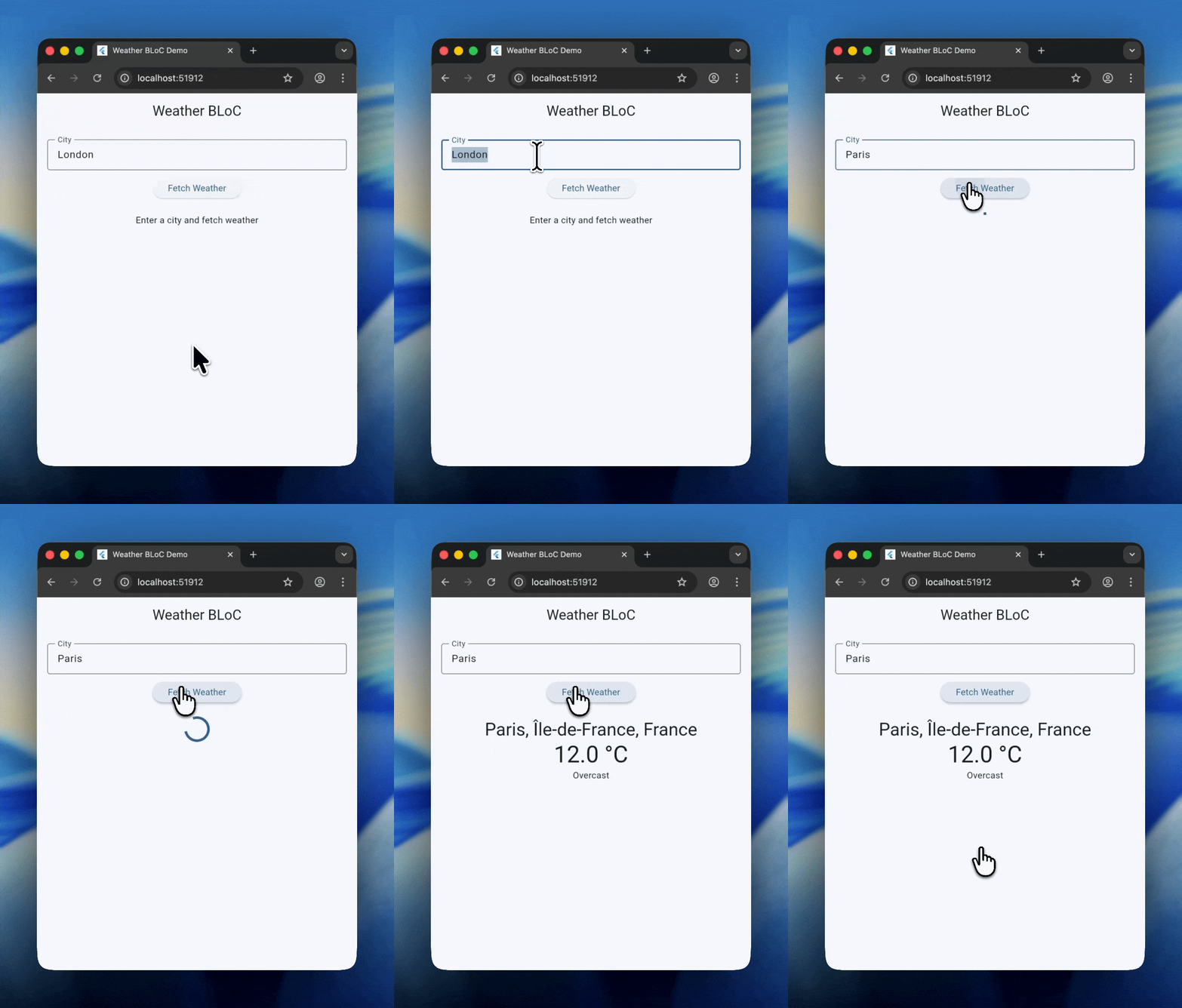
This BLoC uses the modern on<Event>(handler) style. Fetch shows a loading
state. Refresh tries to update without forcing a spinner, so the UI stays stable
when the user is already looking at data.
This code emits WeatherFailure on refresh errors. In some apps you might
keep the previous WeatherSuccess state and show a non-blocking toast
instead. That’s a product decision, not an architecture limitation.
If you want a refresh button in the UI, you already have the event. Add an
IconButton in the AppBar that dispatches
WeatherRefreshRequested(_controller.text) and you’ll get the silent refresh
behavior from the BLoC.
This app uses RepositoryProvider at the root so any feature can read the
repository. It also registers a global BlocObserver so state transitions show
up in logs.
BLoC isn’t popular because it’s trendy. It sticks because it turns app behavior
into something you can reason about under pressure. When the codebase grows, the
team grows, and production issues start showing up at 2 AM, having one
predictable place where “what happened” becomes “what state did we emit, and
why” is the difference between fast fixes and long debugging sessions.
Other benefits include:
Testability without an emulator: WeatherBloc has no dependency on Flutter
rendering, so you can test it using unit tests. The
bloc_test package makes those tests
read like specs.
Traceability with BlocObserver: A BlocObserver gives you a global lens into
the app’s behavior. When state transitions are visible, debugging becomes less
like archaeology.
Separation of concerns at team scale: The UI consumes states. It does not
fetch or parse data. The repository handles IO and parsing. The BLoC handles
orchestration. That division is what keeps larger teams from stepping on each
other.
Shorebird gives Flutter teams code push, so critical
fixes can ship without waiting on store review. That only stays safe if the code
you’re patching is predictable.
BLoC helps by concentrating behavior in small, isolated units. If the weather
refresh behavior is wrong, the fix is likely confined to WeatherBloc or
WeatherRepository, not scattered across widget lifecycle methods. Smaller
change surface, smaller blast radius.
BLoC asks for more structure up front. The payoff is clarity under pressure.
When async calls overlap, when screens multiply, when hot fixes need to ship
quickly, a predictable “event in, state out” architecture is what keeps a
Flutter app maintainable.
If you’re building something that will grow beyond one developer and one
quarter, BLoC is a pattern worth investing in. Once it’s in place, a tool like
Shorebird makes delivery match the architecture, fast
updates without crossing fingers.