Skip to content

Development Workflow

This guide will walk through an opinionated development workflow with Shorebird. We’ll cover how to automate releasing and patching with Shorebird to streamline the entire development process so that you and your team can focus on shipping high quality features to customers.

This guide assumes you are already familiar with Shorebird and have integrated it into your application. Refer to the getting started instructions for more information. In addition, this guide also assumes that you are familiar with GitHub Actions and Git.

Shorebird provides a set of tools that you can use to push over the air updates to your customers but it’s up to you to decide how to integrate it into your development workflow.

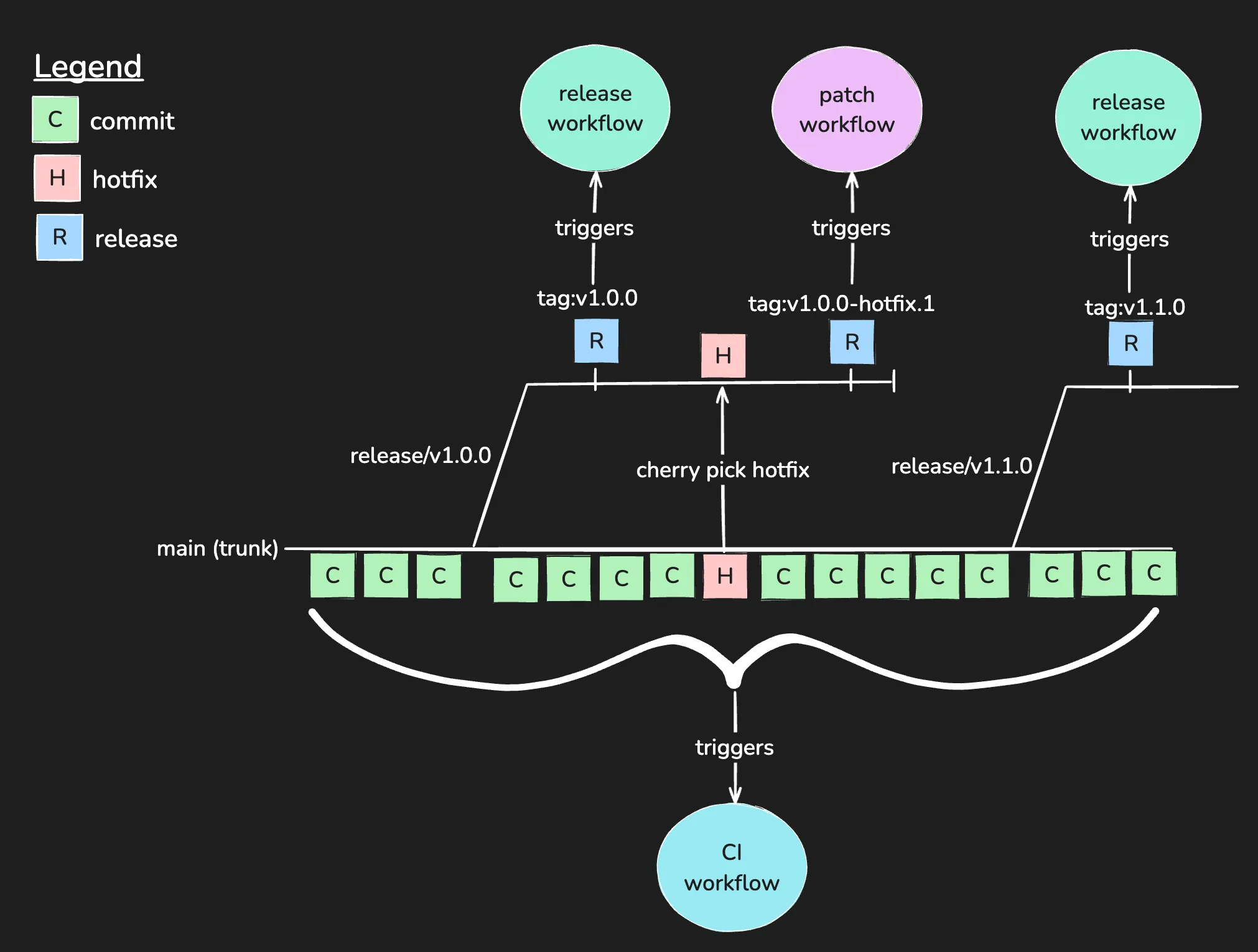
While there are many ways to integrate Shorebird, the following workflow is a common approach that we recommend:

Development Workflow

The illustration above, uses trunk based development and tags to trigger automated release and patch workflows.

The workflow consists of three main phases:

  1. Development: Developers work on features and bug fixes.
  2. Release: When a feature is ready, a release is created and distributed to customers (typically via stores).
  3. Patch: If a critical bug is found, a patch is created and distributed to customers immediately via Shorebird.

Let’s walk through each phase in more detail.

During this phase, developers are building features and fixing bugs.

The development workflow can be broken down into the following steps:

  1. Create branch from trunk (main)
  2. Work on task
  3. Open a pull request to merge changes into trunk
  4. Squash and merge after CI checks & code review. We recommend squashing commits to keep the commit history clean and to make it easier to cherry pick commits into release branches.

Note that with the described workflow, the trunk (e.g. main) is always in a releasable state. This puts pressure on continuous integration (CI) checks to ensure that the code on the trunk is always in a healthy, deployable state. Checks that would typically run as part of the continuous integration process include linting, formatting, unit tests, and integration tests. CI checks are typically run on every pull request and must be passing before the pull request can be merged.

You can refer to the following GitHub Actions workflow for an example.


name: ci

concurrency:
  group: ${{ github.workflow }}-${{ github.ref }}
  cancel-in-progress: true

on:
  pull_request:
    branches:
      - main

jobs:
  ci_checks:
    runs-on: ubuntu-latest

    steps:
      - name: 📚 Git Checkout
        uses: actions/checkout@v4

      - name: 🐦 Setup Flutter
        uses: subosito/flutter-action@v2

      - name: 📦 Install Dependencies
        run: flutter pub get

      - name: ✨ Format
        run: dart format --set-exit-if-changed .

      - name: 🔍 Analyze
        run: dart analyze --fatal-warnings .

      - name: 🧪 Test
        run: flutter test --coverage

When the team is ready to distribute a new version of the app, a release is created. In some cases, releases are created on a regular cadence (e.g. weekly, bi-weekly, monthly) while in other cases, releases are created on an ad-hoc basis.

The release workflow can be broken down into the following steps:

  1. Create a release branch (e.g release/v1.0.0) from trunk (main)
  2. Create a new release on GitHub (e.g. v1.0.0). This tags the commit so that we can easily find the commit in the future and triggers the release workflow
  3. The release workflow is triggered by the tag and generates signed artifacts
  4. Distribute the artifacts (e.g. via AppStore, PlayStore, etc.)

You can refer to the following GitHub Actions workflow for an example.

name: release

on:
  push:
    tags:
      - "v[0-9].[0-9]+.[0-9]+" # e.g. v1.0.0

env:
  SHOREBIRD_TOKEN: ${{ secrets.SHOREBIRD_TOKEN }}
  FLUTTER_VERSION: 3.35.2

jobs:
  release-android:
    runs-on: ubuntu-latest

    name: 🤖 Release Android

    steps:
      - name: 📚 Git Checkout
        uses: actions/checkout@v5

      - name: ☕️ Setup Java
        uses: actions/setup-java@v4
        with:
          java-version: "17"
          distribution: "temurin"
          cache: gradle

      - name: 🐦 Setup Shorebird
        uses: shorebirdtech/setup-shorebird@v1
        with:
          cache: true

      - name: 🔐 Decode Keystore
        run: echo ${{ secrets.KEYSTORE }} | base64 --decode > ${{ github.workspace }}/keystore.jks

      - name: ✍️ Assemble Key Properties
        run: |
          echo "keyAlias=${{ secrets.KEYSTORE_ALIAS }}" >> ${{ github.workspace }}/android/key.properties
          echo "keyPassword=${{ secrets.KEYSTORE_PASSWORD }}" >> ${{ github.workspace }}/android/key.properties
          echo "storeFile=${{ github.workspace }}/keystore.jks" >> ${{ github.workspace }}/android/key.properties
          echo "storePassword=${{ secrets.KEYSTORE_PASSWORD }}" >> ${{ github.workspace }}/android/key.properties

      - name: 🚀 Shorebird Release
        uses: shorebirdtech/shorebird-release@v1
        with:
          flutter-version: ${{ env.FLUTTER_VERSION }}
          platform: android
          args: "--verbose --artifact=apk"

      - name: 📦 Upload APK
        uses: actions/upload-artifact@v4
        with:
          name: flutter_and_friends-${{ github.ref_name }}.apk
          path: build/app/outputs/apk/release/app-release.apk

      - name: 📦 Upload App Bundle
        uses: actions/upload-artifact@v4
        with:
          name: flutter_and_friends-${{ github.ref_name }}.aab
          path: build/app/outputs/bundle/release/app-release.aab

  release-ios:
    runs-on: macos-latest

    name: 🍎 Release iOS

    steps:
      - name: 📚 Git Checkout
        uses: actions/checkout@v5

      - name: 🐦 Setup Shorebird
        uses: shorebirdtech/setup-shorebird@v1
        with:
          cache: true

      - name: 🛠️ Setup Xcode
        uses: maxim-lobanov/setup-xcode@v1
        with:
          xcode-version: latest-stable

      - name: ✍️ Setup Xcode Signing
        env:
          CERTIFICATE: ${{ secrets.CERTIFICATE }}
          CERTIFICATE_PASSWORD: ${{ secrets.CERTIFICATE_PASSWORD }}
          PROVISIONING_PROFILE: ${{ secrets.PROVISIONING_PROFILE }}
          KEYCHAIN_PASSWORD: ${{ secrets.KEYCHAIN_PASSWORD }}
        # https://docs.github.com/en/actions/deployment/deploying-xcode-applications/installing-an-apple-certificate-on-macos-runners-for-xcode-development
        # Also adds a uuid to the mobile provision so XCode can find it.
        run: |
          # create variables
          CERTIFICATE_PATH=$RUNNER_TEMP/build_certificate.p12
          KEYCHAIN_PATH=$RUNNER_TEMP/app-signing.keychain-db
          PP_PATH=$RUNNER_TEMP/temp.mobileprovision

          # import certificate and provisioning profile from secrets
          echo -n "$CERTIFICATE" | base64 --decode -o $CERTIFICATE_PATH
          echo -n "$PROVISIONING_PROFILE" | base64 --decode -o $PP_PATH

          # create temporary keychain
          security create-keychain -p "$KEYCHAIN_PASSWORD" $KEYCHAIN_PATH
          security set-keychain-settings -lut 21600 $KEYCHAIN_PATH
          security unlock-keychain -p "$KEYCHAIN_PASSWORD" $KEYCHAIN_PATH

          # import certificate to keychain
          security import $CERTIFICATE_PATH -P "$CERTIFICATE_PASSWORD" -A -t cert -f pkcs12 -k $KEYCHAIN_PATH
          security list-keychain -d user -s $KEYCHAIN_PATH
          security find-identity -v

          # use uuid for the name of provisioning profile
          UUID=$(/usr/libexec/PlistBuddy -c "Print UUID" /dev/stdin <<< $(/usr/bin/security cms -D -i $PP_PATH))

          # apply provisioning profile
          mkdir -p ~/Library/MobileDevice/Provisioning\ Profiles
          cp $PP_PATH ~/Library/MobileDevice/Provisioning\ Profiles/$UUID.mobileprovision

      - name: 🚀 Shorebird Release
        uses: shorebirdtech/shorebird-release@v1
        with:
          flutter-version: ${{ env.FLUTTER_VERSION }}
          platform: ios
          args: "--export-options-plist ios/GHAExportOptions.plist --verbose"

      - name: 🧹 Clean Up
        if: ${{ always() }}
        run: |
          PP_PATH=$RUNNER_TEMP/temp.mobileprovision
          security delete-keychain $RUNNER_TEMP/app-signing.keychain-db
          rm $RUNNER_TEMP/temp.mobileprovision

      - name: 📦 Upload Artifact
        uses: actions/upload-artifact@v4
        with:
          name: flutter_and_friends-${{ github.ref_name }}.ipa
          path: build/ios/ipa/flutter_and_friends.ipa

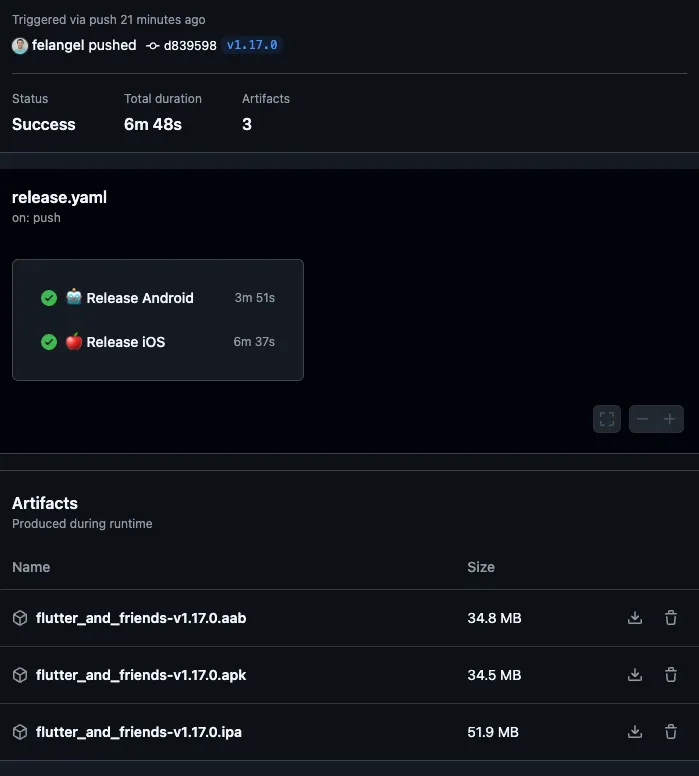
When the release workflow has finished running, the artifacts are ready to be distributed to customers via the appropriate channels.

Release Workflow

Even with great testing, sometimes bugs can creep into the app. Shorebird allows you to fix these bugs and distribute the patches to customers devices immediately rather having to wait for users to update.

The patch workflow can be broken down into the follow steps:

  1. Fix the bug on the trunk branch using the development workflow described above.

  2. Cherry pick the commit into the desired release branch(es)

    git checkout release/v1.0.0
    git cherry-pick <commit-hash>
    git push
  3. Create a new “hotfix” release on GitHub (e.g. v1.0.0-hotfix.1) This tags the commit so that we can easily find the commit in the future and triggers the patch workflow

  4. The patch workflow is triggered by the tag and uploads the hotfix to the staging environment

  5. Preview the release in the staging environment using the Shorebird CLI and validate the fix

    shorebird preview --track=staging
  6. Promote the hotfix to production from the Shorebird Console.

You can refer to the following GitHub Actions workflow for an example.

name: patch

on:
  push:
    tags:
      - "v[0-9].[0-9]+.[0-9]+-hotfix.[0-9]+" # e.g. v1.0.0-hotfix.1

env:
  SHOREBIRD_TOKEN: ${{ secrets.SHOREBIRD_TOKEN }}

jobs:
  patch-android:
    runs-on: ubuntu-latest

    name: 🤖 Patch Android

    steps:
      - name: 📚 Git Checkout
        uses: actions/checkout@v5

      - name: ☕️ Setup Java
        uses: actions/setup-java@v4
        with:
          java-version: "17"
          distribution: "temurin"
          cache: gradle

      - name: 🐦 Setup Shorebird
        uses: shorebirdtech/setup-shorebird@v1
        with:
          cache: true

      - name: 🔐 Decode Keystore
        run: echo ${{ secrets.KEYSTORE }} | base64 --decode > ${{ github.workspace }}/keystore.jks

      - name: ✍️ Assemble Key Properties
        run: |
          echo "keyAlias=${{ secrets.KEYSTORE_ALIAS }}" >> ${{ github.workspace }}/android/key.properties
          echo "keyPassword=${{ secrets.KEYSTORE_PASSWORD }}" >> ${{ github.workspace }}/android/key.properties
          echo "storeFile=${{ github.workspace }}/keystore.jks" >> ${{ github.workspace }}/android/key.properties
          echo "storePassword=${{ secrets.KEYSTORE_PASSWORD }}" >> ${{ github.workspace }}/android/key.properties

      - name: 🧩 Shorebird Patch
        uses: shorebirdtech/shorebird-patch@v1
        id: shorebird-patch
        with:
          release-version: latest
          platform: android
          args: "--verbose --staging"

  patch-ios:
    runs-on: macos-latest

    name: 🍎 Patch iOS

    steps:
      - name: 📚 Git Checkout
        uses: actions/checkout@v5

      - name: 🐦 Setup Shorebird
        uses: shorebirdtech/setup-shorebird@v1
        with:
          cache: true

      - name: 🛠️ Setup Xcode
        uses: maxim-lobanov/setup-xcode@v1
        with:
          xcode-version: latest-stable

      - name: ✍️ Setup Xcode Signing
        env:
          CERTIFICATE: ${{ secrets.CERTIFICATE }}
          CERTIFICATE_PASSWORD: ${{ secrets.CERTIFICATE_PASSWORD }}
          PROVISIONING_PROFILE: ${{ secrets.PROVISIONING_PROFILE }}
          KEYCHAIN_PASSWORD: ${{ secrets.KEYCHAIN_PASSWORD }}
        # https://docs.github.com/en/actions/deployment/deploying-xcode-applications/installing-an-apple-certificate-on-macos-runners-for-xcode-development
        # Also adds a uuid to the mobile provision so XCode can find it.
        run: |
          # create variables
          CERTIFICATE_PATH=$RUNNER_TEMP/build_certificate.p12
          KEYCHAIN_PATH=$RUNNER_TEMP/app-signing.keychain-db
          PP_PATH=$RUNNER_TEMP/temp.mobileprovision

          # import certificate and provisioning profile from secrets
          echo -n "$CERTIFICATE" | base64 --decode -o $CERTIFICATE_PATH
          echo -n "$PROVISIONING_PROFILE" | base64 --decode -o $PP_PATH

          # create temporary keychain
          security create-keychain -p "$KEYCHAIN_PASSWORD" $KEYCHAIN_PATH
          security set-keychain-settings -lut 21600 $KEYCHAIN_PATH
          security unlock-keychain -p "$KEYCHAIN_PASSWORD" $KEYCHAIN_PATH

          # import certificate to keychain
          security import $CERTIFICATE_PATH -P "$CERTIFICATE_PASSWORD" -A -t cert -f pkcs12 -k $KEYCHAIN_PATH
          security list-keychain -d user -s $KEYCHAIN_PATH
          security find-identity -v

          # use uuid for the name of provisioning profile
          UUID=$(/usr/libexec/PlistBuddy -c "Print UUID" /dev/stdin <<< $(/usr/bin/security cms -D -i $PP_PATH))

          # apply provisioning profile
          mkdir -p ~/Library/MobileDevice/Provisioning\ Profiles
          cp $PP_PATH ~/Library/MobileDevice/Provisioning\ Profiles/$UUID.mobileprovision

      - name: 🧩 Shorebird Patch
        uses: shorebirdtech/shorebird-patch@v1
        id: shorebird-patch
        with:
          release-version: latest
          platform: ios
          args: "--export-options-plist ios/GHAExportOptions.plist --staging"

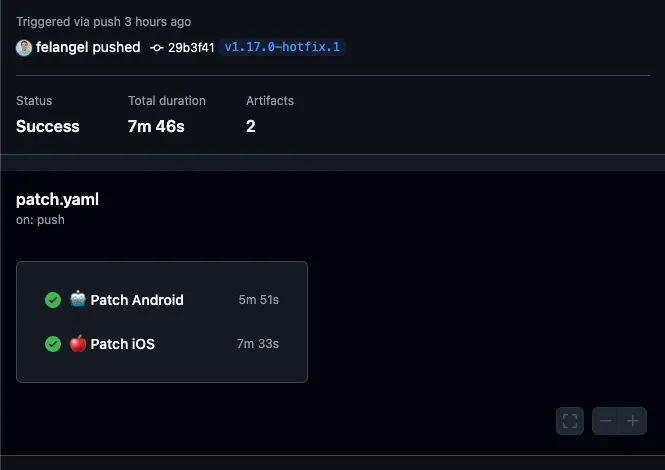
When the patch workflow has finished running, the hotfix is ready to be validated in Shorebird’s staging environment and promoted to production.

Patch Workflow

In this guide, we took a look at an opinionated development workflow with Shorebird which allows teams to automate releasing and patching in order to iterate quickly while still delivering a high quality experience to customers.

To see this workflow in action, check out the Flutter & Friends Conference App.